Shorebird:Deliver Realtime Updates to Your Flutter App

You have a wild idea for your next mobile app, You’re all too excited and hyped up for this next big release. After weeks of development and testing you decide to release the app and hit Publish. The Playstore and App store folks at work review and evaluate your app with all their policies in place measure your app icon size with all scales and rulers and decide to approve your app. You are happy the app hit the stores and your app starts getting traction. Users downloading your app, Everything looks great… except ONE THING.
One of Your novice developer forgot to handle a null check and one of the functionality broke, And Users are seeing blank screens in production no helpful message/error to deal with this issue. The fix is just a couple of lines of code, But it will take a few days for the app to get approved to stores. You have to notify users to update the app, few might many won’t. Even worse Its a weekend the app store reviewers work with limited capacity, meaning long waiting times for a fix that should only take a few minutes. Your business’s stuck and yours users get a bad experience with your product. And You have no choice but wait for the app to get approved.
Sounds familiar?
Hi, I am Mahesh a Software Engineer with a passion for delivering exceptional mobile experiences. In this blog post, I’ll share how I use Shorebird and deliver updates to flutter app on the fly cutting down app update delivery time and reducing turn around time to handle production issues.
By the end of this blog post I will share how to deliver app updates on the fly with shorebird.
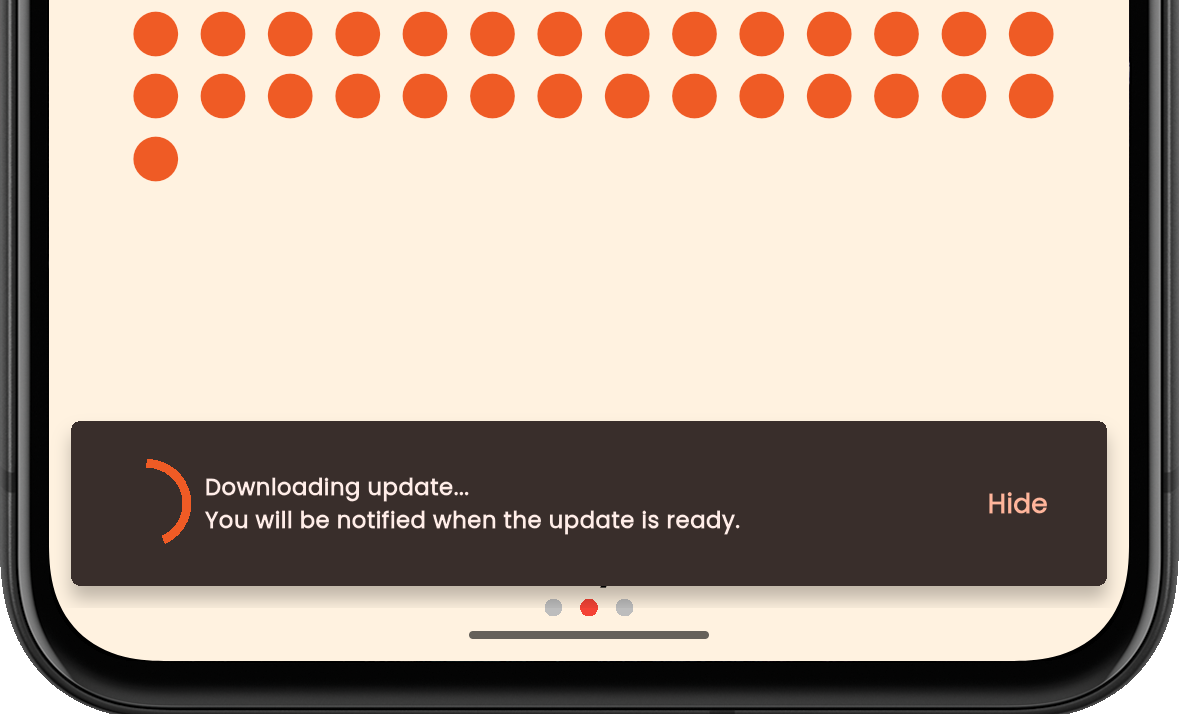
Screenshot of the epoch app downloading the patch
Back Story
If you already know what Shorebird is and would like to know how to integrate Shorebird into your existing app headover to Setting up Shorebird.
And now back to the story, The need for Code push/hot update or Over the air updates started with this issue thread by Eric Seidel, The Founder of Flutter & former Director of Engineering for Flutter/Dart at Google. The twist is He is the same person who opened that issue and came up with a solution Shorebird.dev to help the flutter ecosystem deliver realtime updates to their Flutter apps.
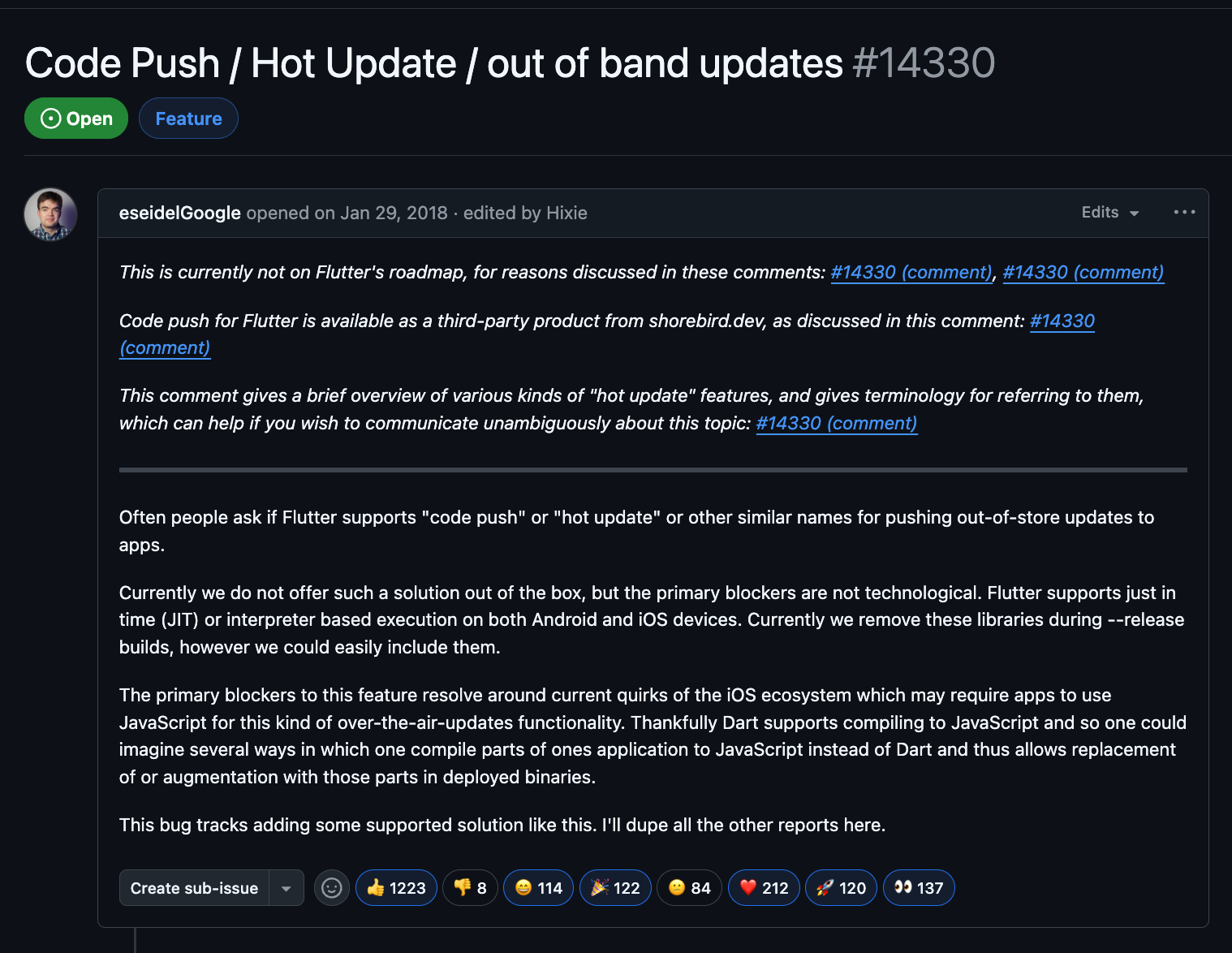
This issue is one of the top most feature request in the flutter ecosystem till date and is open since 2018. There’s a great discussion on that thread on this topic, where people have shared their insights and solutions surrounding this topic I’ll leave the link here Code Push / Hot Update / out of band updates · Issue #14330 · flutter/flutter for you to explore.
Setting up Shorebird
Installing Shorebird
Setting up shorebird is extremely easy and should only take few minutes
- Signup by visiting the shorebird console
- Download and install the Shorebird CLI
MacOS/Linux
curl --proto '=https' --tlsv1.2 https://raw.githubusercontent.com/shorebirdtech/install/main/install.sh -sSf | bash
Windows
Set-ExecutionPolicy RemoteSigned -scope CurrentUser # Needed to execute remote scripts
iwr -UseBasicParsing 'https://raw.githubusercontent.com/shorebirdtech/install/main/install.ps1'|iex
Once shorebird cli is installed, run shorebird doctor to verify the installation is complete.
maheshjamdade@Maheshs-MacBook-Pro epoch % shorebird doctor
Shorebird 1.6.44 • git@github.com:shorebirdtech/shorebird.git
Flutter 3.32.3 • revision 7ac05a80729f189ff1bfd971a512b259638f7f8a
Engine • revision b5245dd80cae75a83b4d464fde2cdf941fc3e1d2

URL Reachability
✓ https://api.shorebird.dev OK (0.3s)
✓ https://console.shorebird.dev OK (0.3s)
✓ https://oauth2.googleapis.com OK (0.2s)
✓ https://storage.googleapis.com OK (0.2s)
✓ https://cdn.shorebird.cloud OK (0.3s)

✓ Shorebird is up-to-date (0.7s)
✓ AndroidManifest.xml files contain INTERNET permission (24ms)
✗ shorebird.yaml found in pubspec.yaml assets (8ms)
  [✗] No shorebird.yaml found in pubspec.yaml assets
✓ Lock files are tracked in source control (59ms)
1 issue detected.
1 issue can be fixed automatically with shorebird doctor --fix.
maheshjamdade@Maheshs-MacBook-Pro epoch %
- Login to the account from the shorebird cli by running
shorebird login
Once you are logged in you are ready to integrate shorebird into your existing flutter project.
Integrating Shorebird into your flutter app Initialize Shorebird inside your existing flutter project
Note: If you are starting a new flutter project shorebird now supports the create command, similar to flutter create shorebird create my_flutter_project and thats the only command you will need to create and setup a flutter project with shorebird initialized and you can skip all the instructions in this section.
cd my_flutter_project
shorebird init
This initialization will ask you the app name to identify your app in list of shorebird projects for your account. This will also create a shorebird.yaml file in the root of your project. This file contains a unique Shorebird app_idand any shorebird related configuration for your app (if needed) will be done here. More on that later.
From the Shorebird docs
Your app_id is not a secret and can be checked into source control and freely shared.
And that is all you need to setup shorebird. Quick and easy!
How shorebird works?
Hereafter when you are ready to publish your app to stores, You need to use the shorebird cli to create a release or publish the patch. Before we go any further it is important to understand the terms release and patch in the context of shorebird to ensure we are aligned
A “release” refers to a new version of the app that is being submitted to the stores generally a apk/appbundle for android or ipa/archive for ios
A “patch” refers to a binary that is being applied to a release. This patch is basically a diff between the release and your current local code.
The idea of patch and release is fairly simple. I will try to explain this in three simple steps
-
You create a new “release” using shorebird CLI. This release is tagged with the version and build number you specify in pubspec.yaml to uniquely identify the release. This is also shown in the shorebird console
-
Once the app is approved in stores. You can use the shorebird cli to patch the updates using just a single command
shorebird patch androidandshorebird patch ioscommands. -
Once the patch is published. This patch gets downloaded in the app in the background when the users reopen the app next time. Users see the updated changes on the next app launch.
Also note that patch sizes correlate with the total amount of Dart changed from the original released app. Each patch is a diff against the released dart code, not a diff to the previous patch.
Creating a release
Android
To build for Android run shorebird release android This command generates the appbundle.
Running shorebird release android --artifact=apk will produce both .apk and .aab files. You can distribute either or both as needed.
IOS
To build for IOS run shorebird release ios This command generates the ipa file.
Shorebird by default uses the latest stable version of the flutter sdk. If you need to create a release with a different version of Flutter, you should use --flutter-version option with the shorebird release command. e.g
shorebird release android --flutter-version=3.22.3 --dart-define=HIDE_MENU=true
Note: Shorebird supports all flutter related flags such as --flavour, --dart-define etc
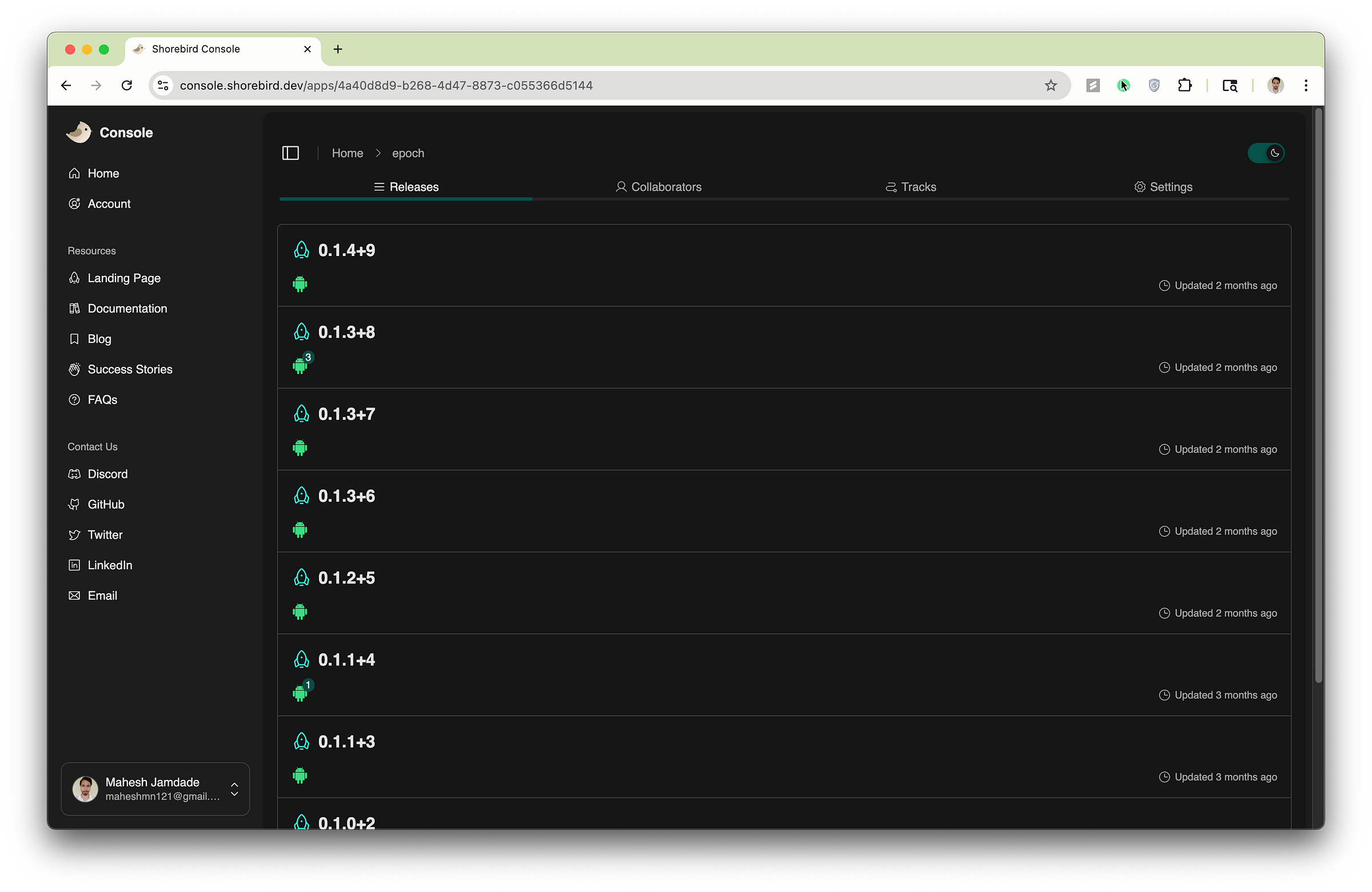
Shorebird console showing list of releases
Creating a Patch
Patches are published corresponding to a particular release and are generally in few hundred kbs. At any given time only one patch is active corresponding to a particular release.
Android
shorebird patch android
IOS
shorebird patch ios
By default a patch is applied to the latest release, If you would like to submit a patch to a different release use the —release-version flag
shorebird patch android --release-version 0.1.0+1
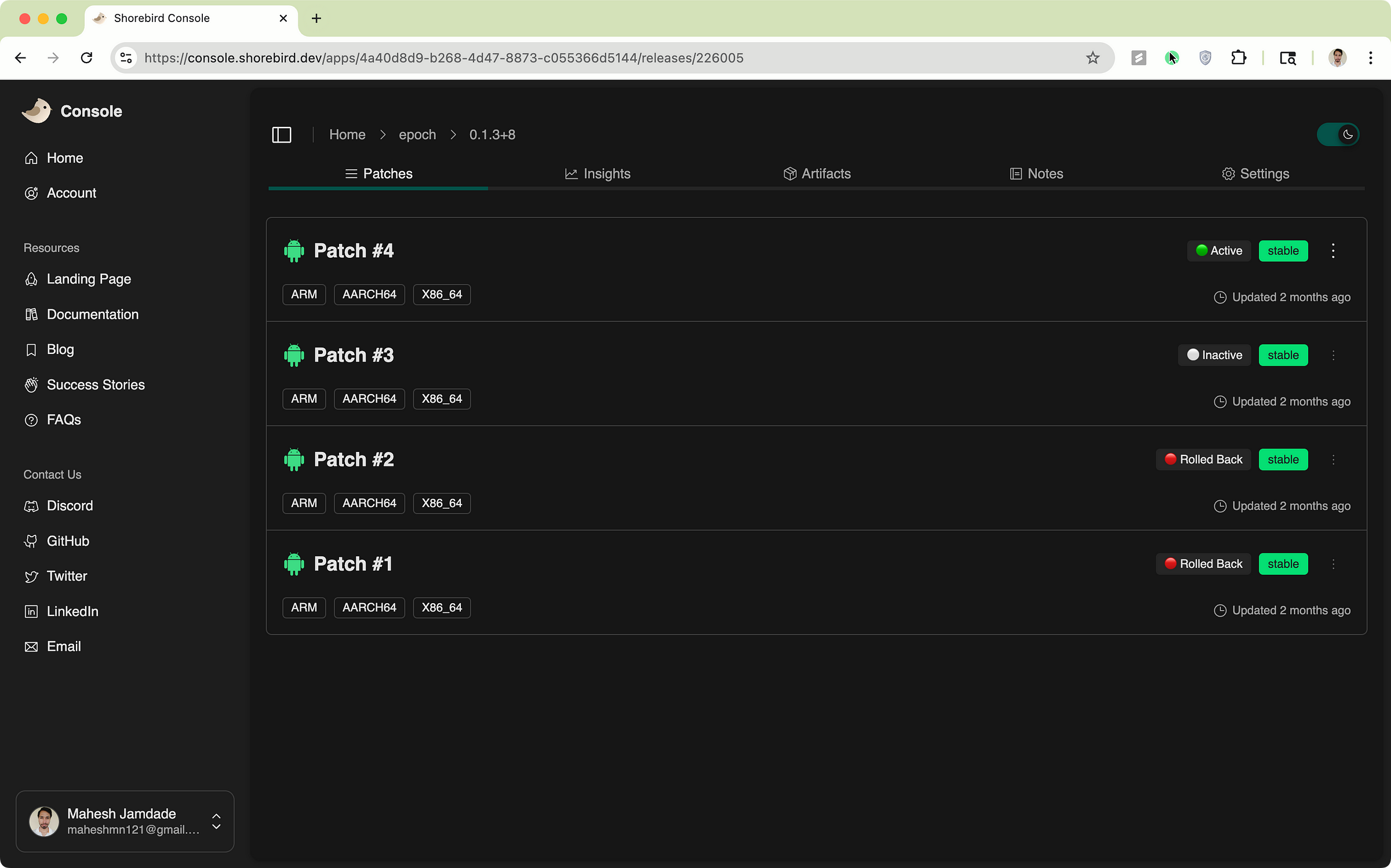
few things to note here before submitting a patch
- Each Patch is published to a particular release, You can submit any number of patches to a release.
- Publishing a patch deactivates the previous obsolete patch.
- The latest patch contains all the dart changes made since the last release was made.
- You should not change the version code or version name in the pubspec.yaml when publishing a patch.
- You should not patch if you update any native code, assets, or any other files that are not part of the dart code.
- You should only patch when there is any change in the dart code including pure dart packages.
- A good rule of thumb is if you have published a patch its good to submit a new release too, this ensures your old and new users get the latest app.
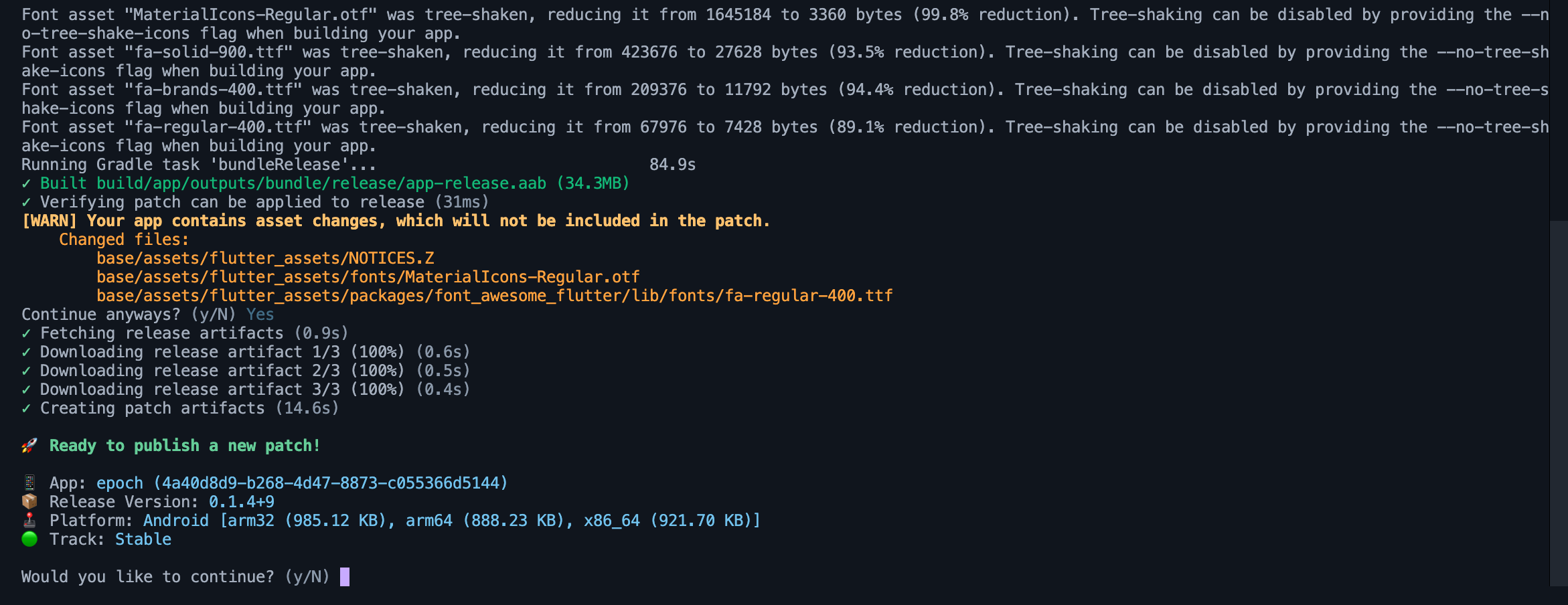
But you don’t have to keep track of what has changed and whether its safe to publish a patch. The Shorebird cli is smart enough to give you a headsup about the files that won’t be included in the patch.
Rollback and Rollforward
No matter how many processes and best practices you add to your release cycle, mistakes are inevitable and you may find your self in a situation where something broke in the production release and this is why we have a patch, but what if you publish a buggy patch?
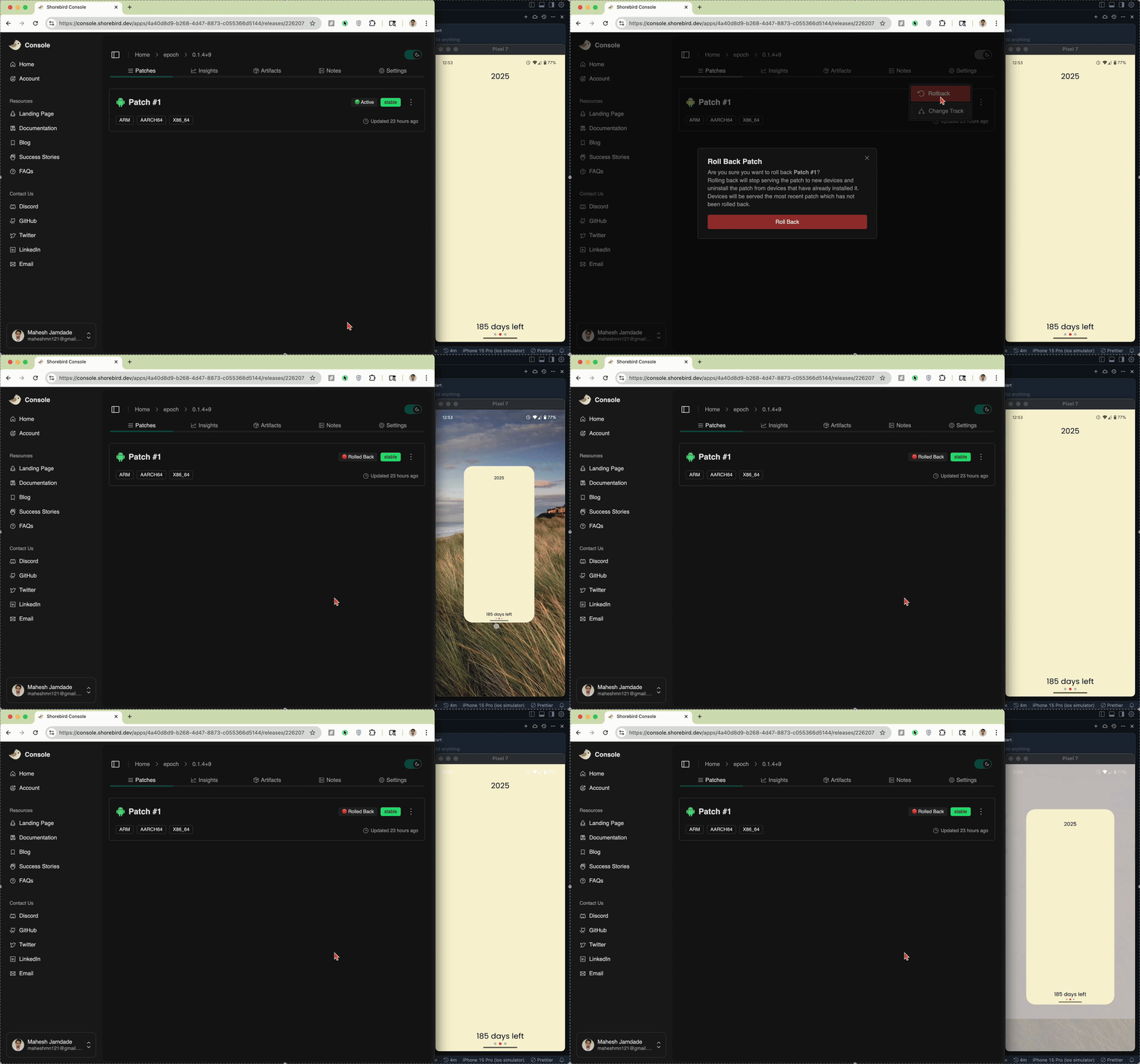
Heres a small instance, despite the above warnings that the assets won’t be included in the patch, I went rogue and published the patch to one of my app. Result? A blank screen because of missing assets.
Demo showcasing a buggy patch being rolled back with a click
But shorebird has this amazing feature of rollback. You go to the shorebird console and rollback the patch and boom your users will come back to the previous state of the app without any additional hassle to update/redownload the app. And if you change your mind you also have an option to rollforward to reactivate a patch. All of this with a single click.
Consider the above example of one of my app epoch.
- The App in store has a version 0.1.4 build 9
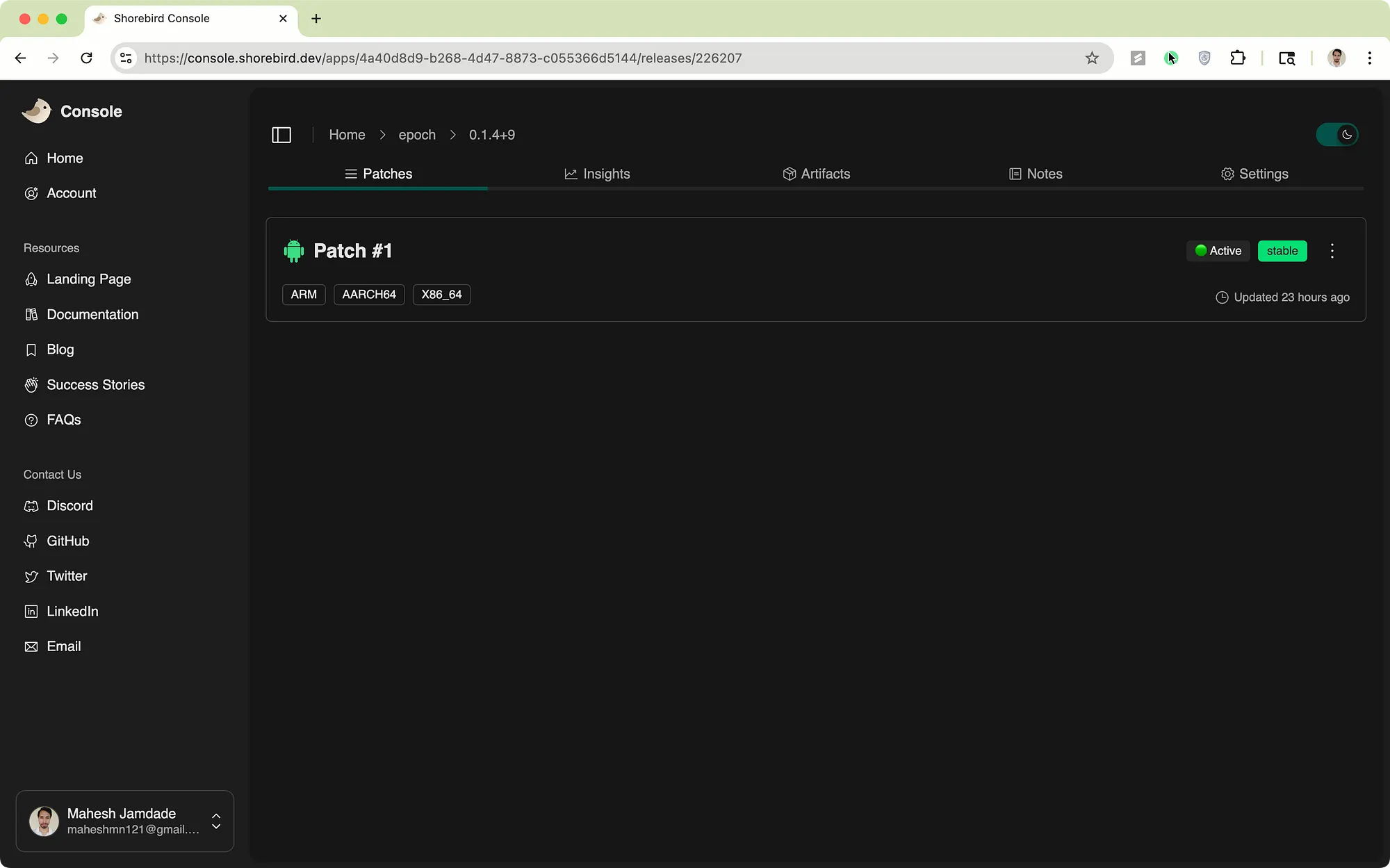
- You make a change to the dart code and create a patch #1
- Then you create a patch #2, this means patch #1 is no longer active.
-
Users who download release 0.1.4 will receive patch #2 on the next app launch.
-
Users who already have patch #1 (existing users) or downloaded the app from store (new users) will receive patch #2
-
Patch #2 contains all the changes you made since the 0.1.4+9 was released. “Again a Patch is just a diff between your current local code and the release”
- Patches will get deleted if users clear the app data. And redownloaded on the next app launch, if they are using the same release for which the patch was created.
Shorebird console showing list of patch corresponding to a release
Manually download the patch
As of now whenever a new patch is published, shorebird silently downloads it in the background on app launch. If you would like to give users the control and manually download a patch. You will need to use a package from shorebird called shorebird_codepush. This is just a programmatic way of notifying users of a new patch and helping you build amazing patch delivery experience while giving your users a greater sense of control.
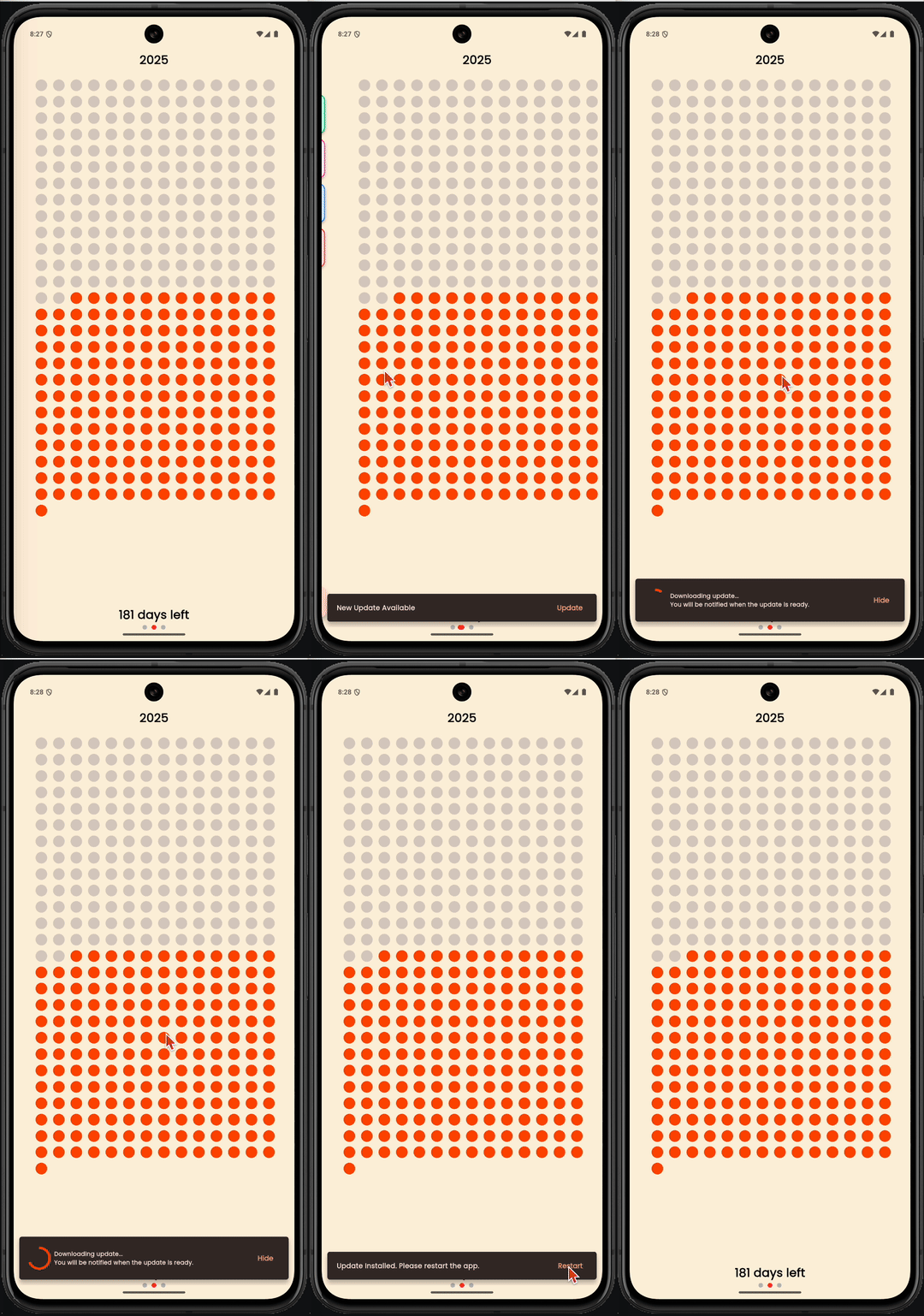
Heres a short demo of how a patch update can be manually downloaded.
And the bare bone starter code to help you implement this feature.
Note that Shorebird_codepush does not currently notify when a patch download is complete. This code sample runs a safe progress of 15 seconds assuming the patch will be downloaded within this time frame.
import 'package:flutter/material.dart';
import 'package:flutter/services.dart';
import 'package:flutter_riverpod/flutter_riverpod.dart';
import 'package:shorebird_code_push/shorebird_code_push.dart';
class Home extends ConsumerStatefulWidget {
const Home({super.key});
ConsumerState<ConsumerStatefulWidget> createState() => _HomeState();
}
class _HomeState extends ConsumerState<Home> {
final updater = ShorebirdUpdater();
void initState() {
_checkForUpdates();
super.initState();
}
Widget _downloadProgress() {
return TweenAnimationBuilder<double>(
duration: _updateDuration,
tween: Tween(begin: 0.0, end: 1.0),
onEnd: () {
if (patchFailed) {
return;
}
ScaffoldMessenger.of(context).hideCurrentSnackBar();
_showRestartSnackBar();
},
builder: (BuildContext context, double value, Widget? child) {
return Padding(
padding: const EdgeInsets.symmetric(vertical: 5),
child: Row(
children: [
CircularProgressIndicator(value: value),
SizedBox(width: 20),
Text('Downloading update...'),
],
),
);
},
);
}
final Duration _updateDuration = const Duration(seconds: 15);
Future<void> restartApp() async {
SystemChannels.platform.invokeMethod('SystemNavigator.pop');
}
Future<void> _checkForUpdates() async {
await Future.delayed(const Duration(seconds: 2));
final status = await updater.checkForUpdate();
if (status == UpdateStatus.outdated) {
_showUpdateAvailable();
} else if (status == UpdateStatus.restartRequired) {
_showRestartSnackBar();
}
}
Future<void> _showRestartSnackBar() async {
ScaffoldMessenger.of(context).showSnackBar(
SnackBar(
margin: const EdgeInsets.all(10),
content: Text('Update is installed. Please restart the app.'),
behavior: SnackBarBehavior.floating,
duration: const Duration(seconds: 500),
action: SnackBarAction(label: 'Restart', onPressed: restartApp),
),
);
}
bool patchFailed = false;
Future<void> _showUpdateAvailable() async {
ScaffoldMessenger.of(context).showSnackBar(
SnackBar(
margin: const EdgeInsets.all(10),
content: Text('An update is available!'),
behavior: SnackBarBehavior.floating,
duration: const Duration(seconds: 500),
action: SnackBarAction(
label: 'Update',
onPressed: () async {
try {
// Hide the initial snackbar
ScaffoldMessenger.of(context).hideCurrentSnackBar();
await updater.update();
// Show the downloading progress snackbar
ScaffoldMessenger.of(context).showSnackBar(
SnackBar(
margin: const EdgeInsets.all(10),
content: _downloadProgress(),
behavior: SnackBarBehavior.floating,
duration: _updateDuration,
),
);
} on UpdateException catch (error) {
patchFailed = true;
ScaffoldMessenger.of(context).hideCurrentSnackBar();
ScaffoldMessenger.of(context).showSnackBar(
SnackBar(
content: Text('${error.message}'),
duration: const Duration(seconds: 500),
behavior: SnackBarBehavior.floating,
action: SnackBarAction(
label: 'Close',
onPressed: () {
ScaffoldMessenger.of(context).hideCurrentSnackBar();
},
),
),
);
}
},
),
),
);
}
Widget build(BuildContext context) {
return Scaffold(body: Container());
}
}
And that is all from this blog post, I hope this guide will help you deliver bold releases swiftly and confidently on the fly with Shorebird.
Heres a fun idea to make this even more better
Shorebird also integrates well with github actions. That means you could configure it in a way that would allow sending firebase notifications to your app when a patch is published with a single commit. I will leave that challenge for you to explore.
Until next time 👋🏻
Thanks for Reading and Happy Fluttering 💙